Cross-Platform Support
PlumeImpactor works across multiple operating systems:
- Windows
- macOS
- Linux
You can manage your iPhone, iPad, or Apple TV apps from your preferred platform.
Free Cydia Impactor alternative for signing and installing IPA apps on Windows, macOS, and Linux.
Latest Version: PlumeImpactor v2.6.0
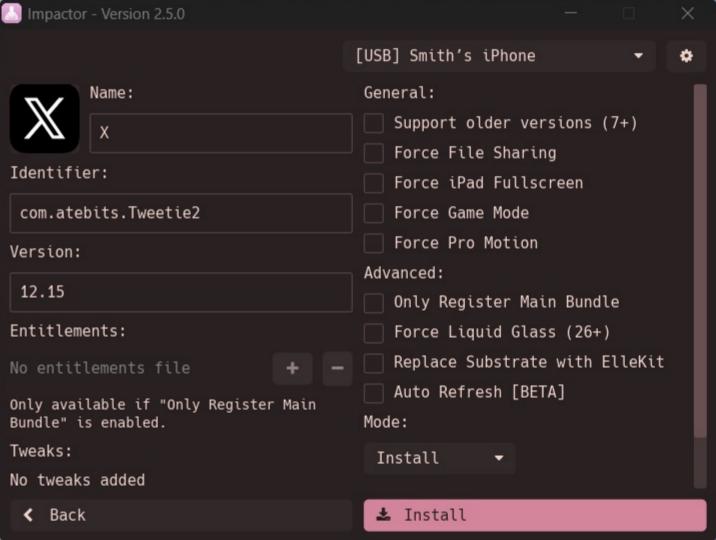
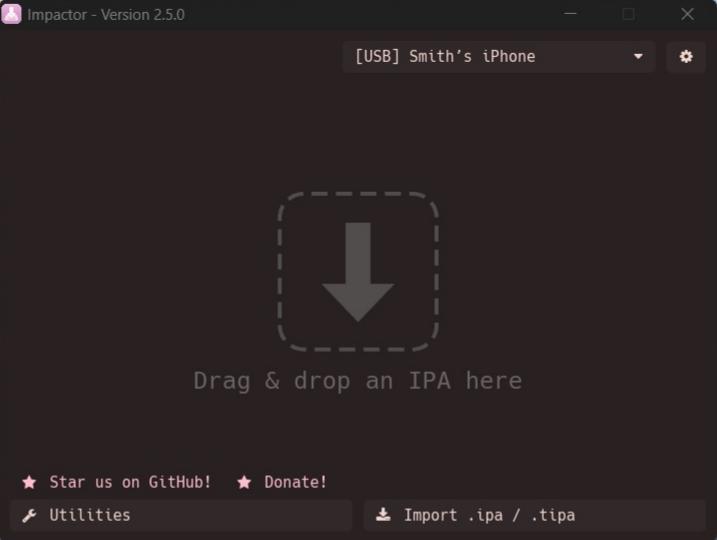
PlumeImpactor is a modern, open-source alternative to Cydia Impactor for iOS app sideloading. It is a powerful cross-platform tool that allows users to install, sign, and manage iOS, iPadOS, and tvOS applications on Windows, macOS, and Linux.
With a simple interface and advanced features, PlumeImpactor makes sideloading IPA files easier for beginners while offering powerful customization options for advanced users.
Whether you want to install SideStore, LiveContainer, IPA apps, jailbreak tools, or custom tweaks, PlumeImpactor provides a complete sideloading solution without requiring a jailbreak.
PlumeImpactor comes with a clean and user-friendly design that makes installing and managing apps simple. The easy-to-use interface helps both beginners and experienced users quickly complete sideloading tasks.
PlumeImpactor works across multiple operating systems:
You can manage your iPhone, iPad, or Apple TV apps from your preferred platform.
Install and sign applications on Apple devices without jailbreaking. PlumeImpactor supports:
PlumeImpactor provides proper support for popular sideloading tools, including:
It can generate required files and configurations to help these apps work correctly.
Advanced users can customize applications with built-in modification support. Features include:
Keep your sideloaded apps active with automatic certificate refreshing. PlumeImpactor can refresh apps in the background, reducing the need for manual resigning.
PlumeImpactor is completely free and open source. The project is available on GitHub under open-source licenses, allowing developers and users to review, improve, and contribute to the project.
PlumeImpactor can generate and install pairing files that allow supported apps to communicate with your device wirelessly.
Supported apps
Pairing files are device-specific and may become invalid after restoring, updating, or re-trusting your device.
PlumeImpactor can generate P12 certificates for apps such as SideStore, AltStore, and LiveContainer.
This provides a similar experience to AltServer while giving users more control over their signing setup.
PlumeImpactor can run in the background, allowing easier access to:
PlumeImpactor simplifies the iOS app signing and sideloading process by recreating the workflow normally handled by Xcode. It uses your Apple ID to communicate with Apple’s developer services and generate the required files needed to install apps on your device.
When signing an IPA file, PlumeImpactor creates:
After generating the required signing files, PlumeImpactor signs the IPA and installs it directly on your iPhone, iPad, or Apple TV.
A free Apple Developer account provides limited signing time and app availability, while a paid developer account offers longer certificate validity and fewer restrictions.
Installing IPA files with PlumeImpactor is simple and beginner-friendly. The interface is designed to provide a similar experience to classic tools like Cydia Impactor.
Open PlumeImpactor and connect your iPhone, iPad, or Apple TV using USB or Wi-Fi.
Select your device from the device list.
Then open Settings and sign in with your Apple ID to enable app signing.
Click Import and select the IPA file you want to install.
PlumeImpactor will prepare the application for signing and installation.
Before installation, you can adjust app details such as:
Advanced users can also enable extra customization features when available.
Click Install and enter your Apple ID credentials if requested.
PlumeImpactor will automatically sign the IPA and install it on your device.
After installation, open your iPhone or iPad settings:
Settings → General → VPN & Device Management
Select your Apple ID profile and tap Trust.
The app is now ready to open and use.
With PlumeImpactor, users can easily install IPA apps, manage signing certificates, and sideload applications on iOS devices without requiring a jailbreak.
Latest Version: PlumeImpactor v2.6.0
Get the latest build for your computer — Windows, macOS, and Linux.
Install iTunes to enable Apple device communication drivers.
Supports macOS 11 and newer.
Works on Apple Silicon Macs.
Requires usbmuxd for device communication.
Some Linux distributions may require additional permissions:
$ chmod +x /path/to/AppImageQuick answers about supported devices, Apple IDs, SideStore, and signing limits.
PlumeImpactor supports iOS 9 and newer versions.
No. PlumeImpactor is designed for normal iOS devices and does not require a jailbreak.
With a free Apple Developer account:
Yes. PlumeImpactor supports SideStore installation, pairing files, and certificate generation.
On iOS 16 and newer, Developer Mode must be enabled:
Settings → Privacy & Security → Developer Mode
Yes. PlumeImpactor is open source and available for community contributions.
PlumeImpactor is a complete iOS sideloading solution for installing IPA apps, managing certificates, supporting SideStore, LiveContainer, and providing advanced customization tools for iPhone and iPad users.
Install pairing files to specific apps so they can talk to your device wirelessly. SideStore, Feather, StikDebug, LiveContainer, and more are supported.
PlumeImpactor runs in the background on all platforms — ready for quick access to the GUI and refreshable apps.